PRODUCT RELEASE NOTESRivet 1.9.5 · Plan Workspace 2.0More precise takeoffs, reusable estimating tools, drawing revision review, team workflows, browser notification preferences, and clearer mobile controls.
UPDATEDOctober 8, 2026New web improvements are live. Current Windows and Android public versions are listed below; this page separates website updates from changes still awaiting a Store release.
DOWNLOADSChoose your platformThe download page shows what is available now and where each store update stands.
PLATFORM AVAILABILITY
Current public releases
Verified October 8, 2026
LIVE
Web · 1.9.5
Plan Workspace 2.0 supports a reviewed owner upgrade: scale regions, traceable scopes, recipes, room finishes, repeated units, revision review and retained issue evidence.
Store versions reflect the latest public releases verified on the date above; rollout timing can vary by account or region. Update your editing devices before reviewing your workspace upgrade. Older direct Android 1.9.3 references (build 10830) describe a retired download option. Current Android installation uses Google Play; the old direct-download link opens that store. Windows installation uses Microsoft Store.
OCTOBER 8 · WEB WORKSPACE
Choose how you hear about account and team activity
Signed-in web users can manage optional browser notification preferences from Account Center → Profile. Your browser controls notification permission; if its prompt does not appear or respond, Rivet now explains how to allow notifications in browser settings and try again.
These browser controls are part of the live web workspace. Native notification delivery for installed Android and Windows apps is not included in the Store versions currently listed above.
OCTOBER 4–8 · SEARCH AND REVIEW
Find the work you need without changing shared data
Search My Work, Team projects, plan sheets, takeoffs, estimate lines, inventory, saved assemblies, reusable rates, and proposal measurements.
Sort takeoffs and estimate rows for review without rewriting their saved order.
Large drawing sets and review summaries stay easier to navigate, with clearer progress and status as results finish updating.
OCTOBER 5–8 · ACCESSIBILITY AND PHONE LAYOUTS
Keep controls clear on touchscreens and keyboard
Takeoff controls reflow more cleanly on narrow screens, with larger usable targets and fewer crowded labels.
Dialogs and review workflows keep keyboard focus on the active controls and return it to the place you opened them from.
Screen readers announce settled search results and review changes without repeating every keystroke.
PROTECTED CLOUD RECOVERY
Resume an interrupted Cloud reconnect
The Cloud panel offers reviewed recovery in the original workspace as well as Plan Workspace 2.0. Recovery checks retained keys, encrypted records and saved requests across your workspaces before sync resumes. Interrupted recovery can be retried, and cancelling preserves saved versions.
The guide includes the recovery steps. Check the platform status above for this patch’s availability.
TEAM CONNECTION AND PHONE LAYOUT
Recover a Team connection when Cloud becomes ready
Team now reports a startup failure and lets Refresh or reopening the panel retry the connection. Saved drafts and access checks remain protected. Conflict recovery also handles the latest verified content consistently before queuing a resolved update.
Phone landscape layouts keep the sheet-library button and dialog Close clear of system navigation. These fixes remain in the current platform releases listed above.
WEB · DRAWING PRECISION
Snap to the detail in intricate drawings
Dense CAD-exported PDFs can now retain far more snapping targets without repeatedly checking every line against every fill. This resolves the all-or-nothing snapping failure on the supplied Terrace plan while preserving checks for covered lines.
Snaps now shows the supported segment count and labels partial coverage. Exact line targets, curve approximations and measurement-point snapping remain distinct. Scans do not gain automatic edge detection. This improvement is live on web and included in the published Windows 1.9.46.0 and Android 10865 releases. See current platform availability for the next update.
SEPTEMBER 21 · WEB WORKSPACE
More room for the work in front of you
Takeoffs now puts your work list first, with advanced quantity tools tucked into an expandable section. Estimate options and libraries are grouped into clear menus, and More gives phone users a direct route to Review, Proposal and workspace tools.
Settings is easier to scan, phone forms have more room, and Inventory avoids a second scrolling panel on small screens. These changes are live on the website and included in the publicly available Windows and Android updates.
SEPTEMBER 26 · PLAN WORKSPACE 2.0
Less rework, clearer quantities, easier estimating
This upgrade makes it easier to move from a drawing to an estimate you can check and explain. You have more control over measurements, more ways to reuse work, and a clearer view of what changes when a drawing is revised.
Measure with more control. Use different scales within a sheet, enter exact dimensions, and adjust lines, shapes and deductions. Search your plans and return to saved views without finding your place again.
Do repetitive work once. Reuse measurement settings and material, labour and equipment calculations. Combine measurements across sheets, repeat work by room or location, and keep individual exceptions.
Make complex quantities easier to check. Work through room finishes, wall heights, doors, windows, roof pitch and spacing. Follow a total back to the drawing and calculations behind it.
Stay in control of drawing changes. Compare revisions and review their effect on quantities and prices before applying changes. Keep a record of the drawings, figures and choices behind an issued estimate.
Bring work in and share it clearly. Review Excel and CSV data before importing, bring in supported PDF annotations, and export marked plans with clearer measurement and scale information.
Upgrade with your workspace owner. Update your editing devices, finish drawing drafts, sync eligible changes and save a portable backup. In Cloud, choose Review Plan Workspace 2.0 upgrade. Review each offered Team approval and recipe calculation upgrade afterward. Original projects and plan files are retained, with recovery checkpoints if a stage is interrupted. Older clients cannot continue writing unsupported workspace data.
The current 1.9.5 releases listed above include the protected upgrade review. Recipe starter examples, snapping and revision comparisons still require the estimator’s review.
Keep more of the drawing in view with compact sheet tools, clearer side panels and controls sized for a mouse. Estimate and Review now put the worksheet beside a separately scrolling cost panel, with aligned headings and more usable space on wide screens.
Rivet scrollbars, directional controls and subtle button gloss give the workspace a consistent finish. These refinements are live on the website and included in the published Windows and Android updates.
SEPTEMBER 21 UPDATE
More drawing space on phones and tablets
Plans now groups tools into Measure, Scale, Markup and More. Open one group at a time, and return to the drawing automatically after choosing a measurement tool.
Larger tap targets and wrapping actions prevent crowded text.
The sheet selector, calibration warnings and active measurement controls stay reachable.
Portrait and landscape layouts keep menus within their scrolling areas.
Read the updated Plans guide. Plan Workspace 2.0 requires the reviewed owner upgrade described above. The separately labelled practice copy remains local to this device.
SEPTEMBER 13 UPDATE
Clearer trade symbols and checkout returns
Across all 45 trade sets, 312 symbols have refined artwork and 290 use source-linked drawing or schematic conventions. Items without a published convention retain clearly labeled estimating icons. Match every convention to the project legend.
The library separates plan conventions, schematic conventions, and estimating icons. Existing symbol IDs and takeoff quantities are preserved, including in marked plan PDFs.
Returning from Stripe checkout preserves the selected plan and monthly or annual billing. Billing instructions now point to account subscription management.
Assign tasks, discuss changes, mention teammates, and request a review of a specific estimate revision with Team or Enterprise.
Use My Work to find assigned tasks and reviews from projects synced to this device. The inbox keeps invitations and project updates together, with unread filters and notification preferences.
Set your display name and profile photo. Solo and Trial accounts retain profile-only setup without team collaboration.
Compare published revisions and review changes in quantities and costs before moving forward.
WORKSPACE AND RECOVERY
More room to estimate, clearer ways to recover
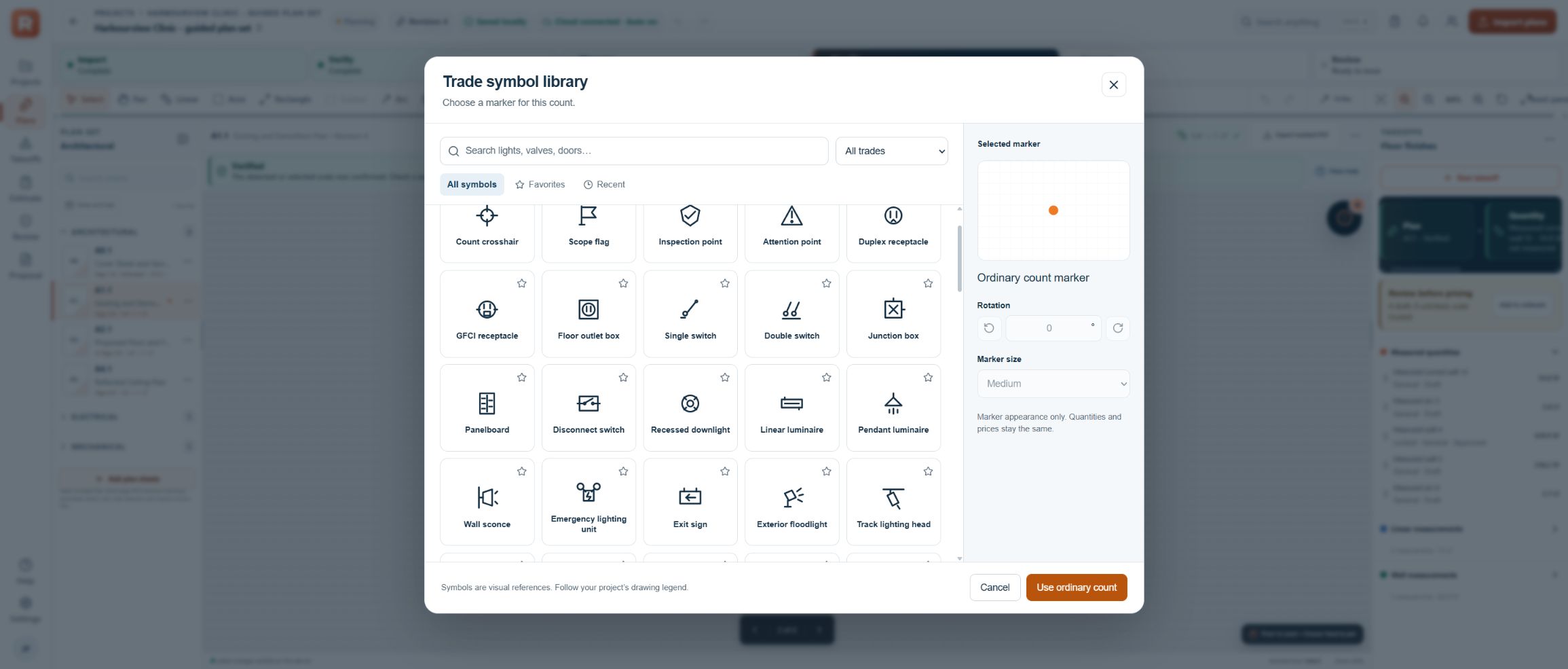
Trade symbols in the current web workspace.
Resize workspace panels for larger displays and ultrawide screens.
Choose from 1,467 count symbols across 45 categories, with clean technical plan symbols, consistent line weights, smooth vector lettering, plan-view fixtures, and distinct painting and wallpaper details. All 57 painting, wallpaper, and wallcovering entries have distinct artwork. Search by trade or item, save favorites, adjust marker size and rotation, and include symbols with full names in marked plan PDF schedules. Larger library previews make each drawing easier to inspect.
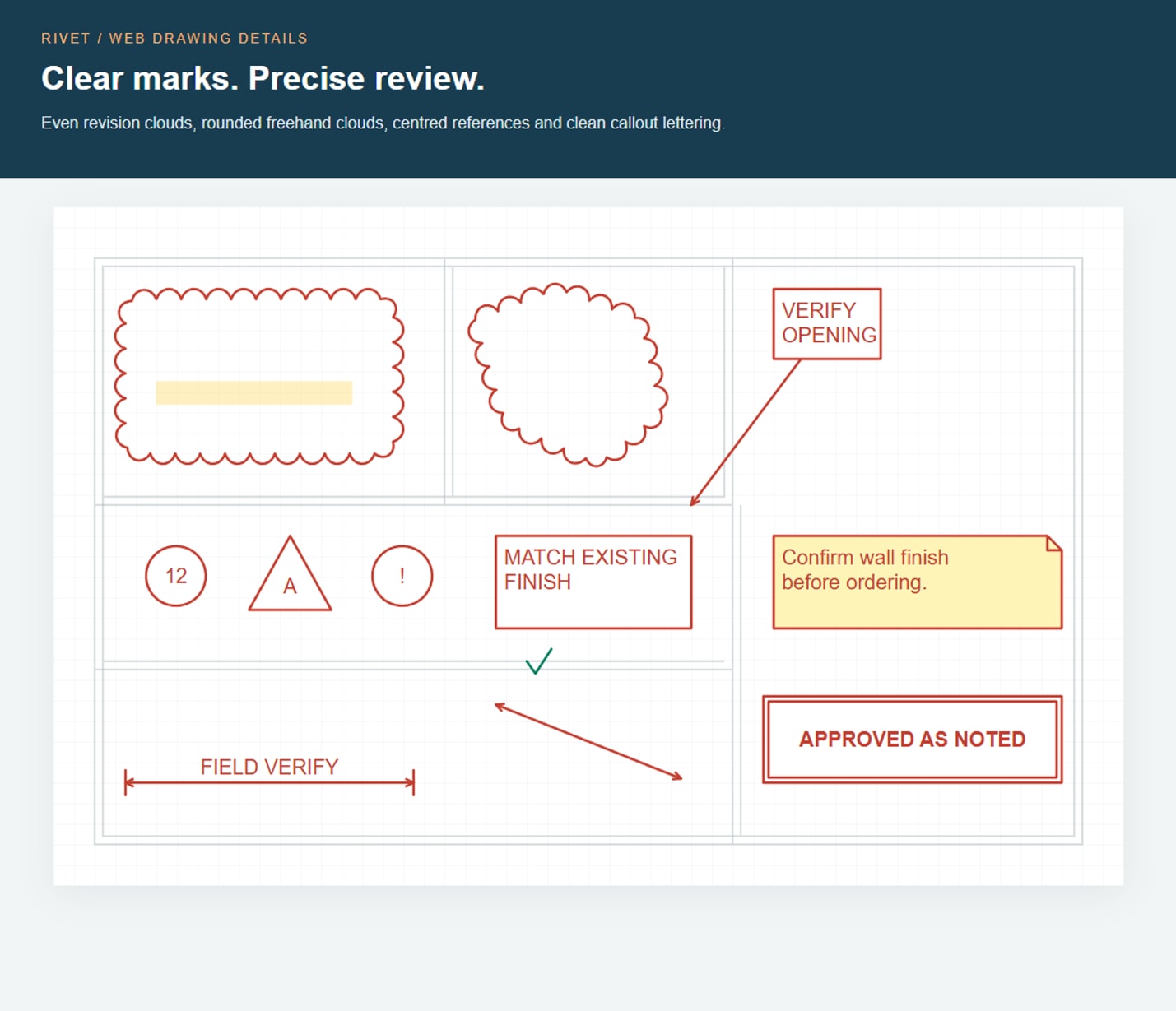
A compact, permanent markup toolbar fits the main tools, colour and undo/redo into one bar above the plan. Text, styling and extra actions open in a menu without reducing the drawing area, including while switching sheets. Choose from 26 annotation tools plus Select and Eraser: revision clouds, freehand clouds and highlights, shapes, arrows, labelled dimension arrows, text boxes, notes, callouts, underline, strikeout, check/cross marks, numbered markers, and 16 review stamps.
Redesigned markup details include smooth, evenly spaced revision clouds, smoother freehand ink, attached boxed callouts, centred circular and revision labels, folded-corner notes, and crisp double-border review stamps. The same geometry and text alignment carry through to PDF exports.
Select and move markups, adjust colour, opacity and line style, resize, rotate, duplicate, erase, or undo and redo changes. Long notes wrap in both the workspace and exported PDFs. Show or hide the review layer and choose whether to include it in the PDF. Markups save with the sheet and retain their author and creation time. Dimension-arrow labels are entered manually; calibrated takeoff tools handle measured quantities.
Download retained pre-restore copies from Settings, including after later edits. Removing a copy requires confirmation that you saved its export.
Follow the updated User Guide for profiles, collaboration, notifications, symbols, and estimating workflows.
Redesigned markup details rendered by the web workspace.
The symbol library and compact markup tools are available in the current 1.9.5 store apps. The latest technical artwork and refined markup details are live on web. See the platform availability section above for the verified status of Windows and Android updates.
Select two or more compatible rows in Takeoffs and choose Group selected. Name the scope you want to price together, such as LVT flooring.
Measurements must share a unit, plan sheet, and revision. Expand the group to review and edit each measurement, including its scale, colours, notes, and source links.
Add compatible rows by combining them with an existing group. Groups are created only when you choose them.
Group before linking takeoffs to an estimate. Ungroup preserves eligible measurements, but existing estimate links and cutout deductions can prevent ungrouping. Undo and Redo retain these protections.
Available in Rivet 1.9.5 on web and in the current Windows and Android store apps. Update through the store you installed from to receive these controls.
SAVE, RECOVER, VERIFY
Clearer save status and stronger recovery tools
Save and Cloud status show edits waiting to be saved locally as well as changes waiting to upload.
Emergency export can preserve the current workspace when normal saving is blocked and identifies unverified saves or unavailable plan files. Keep a verified backup as your main recovery copy.
The browser keeps recovery copies of recent edits for the correct account without replacing newer saved work.
Check a second known dimension and save the result with its sheet and revision. A discrepancy above 1% prevents the check from passing. This check does not guarantee drawing accuracy.
Measured quantities now round consistently, including 16.045 to 16.05, while the original measurement keeps its full precision.
Plan previews now report loading and missing files correctly when switching sheets. Measurement tools wait for the current preview; navigation and draft cancellation remain available.
Confirm detected scale and Calibrate have clearer labels. Use Calibrate to check two points against a printed dimension.
Fixed Cloud access for estimator and reviewer roles. The first-project guide also stays available until you save a takeoff.
Google Play subscriptions open in Google Play for management. Paid access appears after payment confirmation.
These improvements are included in the current 1.9.5 web and store releases. Install store updates to receive native app changes; older direct Android 1.9.3 installations do not include them.
REUSABLE PLAN COLOURS
Reuse measurement colours
Choose from six consistent presets—blue, orange, green, purple, gold, and red—or use a custom colour. A checkmark shows the active choice.
Available on web and in the current Windows store app. These presets are not included in the native Android app.
PUBLIC WEBSITE
A clearer website
A consistent dark design, larger text, and clearer navigation make product information, pricing, guides, downloads, and support easier to find.
Workspace screenshots show the steps from plan calibration to proposal, with a closer look at Plan Pro curve tools.
CLOUD SYNC
See whether automatic sync is running
The header distinguishes Local only, Auto on, Auto off, Sync paused, and Read-only, with a count of changes waiting to upload.
Your automatic-sync choice is preserved. New or incomplete settings default to saving locally.
The current 1.9.5 web, Windows and Google Play releases include the save-status and recovery tools. Platform availability and the published mobile workspace updates are listed above.
PRECISE PLAN PLACEMENT
More precise point placement
A smaller crosshair and centre dot show the point that will be saved, including snapping and orthogonal alignment.
Compact, transparent point markers keep the drawing visible. Selection highlights and exported PDF lines are also easier to read.
Available on web and in the current Windows store app.
PLAN PRO CURVES
Curves now follow the shape you define
Use three shape points for a circular arc, or 4–64 control points for a freeform curve or curved wall.
Lengths use the sheet's calibrated scale; curved-wall quantities also use the entered height. Recalibrating the sheet updates the results.
Create curves on web and in the current Windows store app. Android can open, review, edit, and sync the resulting Linear or Wall measurements, but does not include curve-creation controls.
WORKSPACE UPDATE
More room for work on smaller screens
Compact navigation, forms, and estimate controls fit narrow screens, with larger touch targets and fewer wrapped button labels.
Plan tools keep the marked drawing in view. Takeoff and estimate screens use consistent controls across desktop and mobile.
The guided sample follows one project through calibration, takeoff, pricing, and review.
SAFETY AND ACCESSIBILITY
Clearer checks before issuing an estimate
Review notices identify incomplete scope, pricing, takeoff, and proposal checks. Estimate menus now stay visible above fixed rows.
Sign-in, device access, and recovery messages provide clearer next steps.
Saved local work remains available to read, export, and back up when online access needs renewal. The estimator remains responsible for the final issued price.
ANDROID FIXES
Phone controls fit the screen and respond correctly
Removed the duplicate title bar and the extra space above the project name after rotating a phone.
The trial notice can be dismissed for the current app session and returns on the next startup when it is still relevant.
Precision point adjustment uses a crosshair instead of a hand cursor that hides the placement point.
Every Quick Help action now opens its intended guide, release notes, support page, walkthrough, or feedback destination.
Browser notification preferences are available in the live web workspace. The current Store versions listed above do not include the newer Android and Windows system-push delivery work; use the signed-in Rivet inbox for in-app notices.
Downloaded apps can keep plan work available through the offline access period shown in Account Center. Sign-in, device pairing, uploads, downloads, renewal checks, and account changes still require an internet connection. Each workspace supports up to 2 devices on Solo, 10 on Team, and 50 on Enterprise, with up to two connected devices per named member.
 Rivet EstimatorConstruction takeoff software